
Tutorial: How do IP packets and MAC Frames go together?
It is important to understand how packets and frames are related, and in particular, IP packets vs. Ethernet or MAC frames.
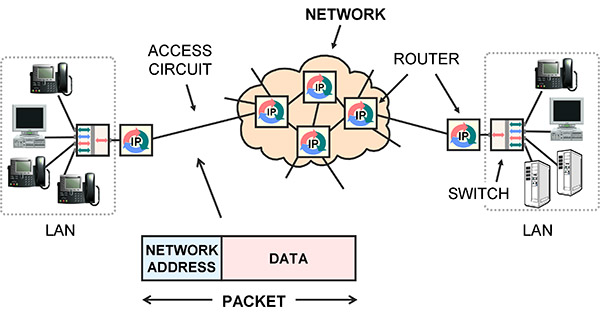
Simple network example. Routers move packets from one circuit to another.
Packets are for networks. A packet is a block of user data, such as a piece of an e-mail message, with a network address on the front. The network address is the final destination. The standard for network addresses is IP.
Network equipment like routers receive an IP packet on an incoming circuit, examine the indicated destination IP address, use it to make a route decision, then implement the decision by forwarding the packet to the next router, on a different circuit.
A frame is a lower-level idea. Frames are used to communicate between stations on the same circuit. The circuit may have multiple stations physically connected onto it, like a wireless LAN, a few stations connected by a LAN switch, or only two stations like a point-to-point LAN cable. Each station has a Media Access Control (MAC) address, sometimes called a hardware address, link address or Layer 2 address.
A frame has framing to mark the beginning and end, sender and receiver MAC addresses to indicate the stations on the circuit, control information, a payload and an error detection mechanism.
The frame is transmitted on the circuit, and all stations on the circuit receive it. If an error is detected at a receiving station, the frame is discarded and might have to be retransmitted somehow.
If no errors are detected, the receiver compares the destination MAC address on the received frame to its own MAC address, and if they are the same, processes the frame, extracting the data payload and passing it to higher level software on the receiver.
If the MAC addresses are not the same, the receiver ignores it and waits for the next one.
The end result is that the payload in the frame is communicated to the correct station on the same circuit, with no errors.
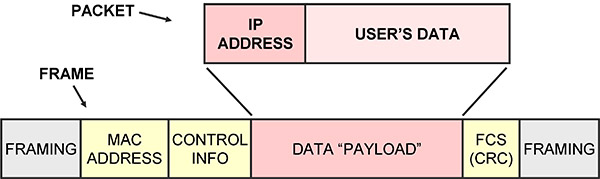
Packet with its IP address vs. frame and its MAC address
The main purpose of packets is to append an IP address to your data. The IP address is used by network equipment to make route decisions: to relay the packet from one circuit to a different circuit. This is accomplished by receiving the packet then transmitting it to a different machine, usually the next router in the chain.
To actually transmit a packet to another router, the packet is inserted as the payload in a frame, then the frame is broadcast on the circuit that connects to the next router.
Notice that there are two addresses: the IP network address and the MAC address.
The IP address on the packet is the final destination, and so does not change. The MAC address on the frame indicates the destination on the current circuit, and so is changed as the data is forwarded from one circuit to another.
This and related topics are covered in:
• Instructor-Led Course 101
Telecom, Datacom and Networking for Non-Engineering Professionals
• DVD-Video V3 Fundamentals of Datacom and Networking
Telecom 101 – Fourth Edition, 2016 released and on sale!
Telecom 101 Textbook – Fourth Edition 2016 is out
– and on sale for a limited time!
 High-Quality Reference Book and Study Guide Covering All Major Topics, Up To Date To 2016… in Plain English.
It’s been eight years since the last edition (an eon in technology time). Hot off the press! The new Fourth Edition is totally updated to today’s IP and Ethernet telecom technologies – while still starting with the fundamentals.
Packed with information, authoritative, up to date, covering all major topics – and written in plain English – Telecom 101 is an invaluable textbook and day-to-day reference on telecommunications.
Telecom 101 covers the core knowledge set required in the telecom business today: the technologies, the players, the products and services, jargon and buzzwords, and most importantly, the underlying ideas… and how it all fits together.
The course materials for Teracom’s famous Course 101 Telecom, Datacom and Networking for Non-Engineers, augmented with additional topics and bound in this one volume bring you consistency, completeness and unbeatable value.
Our approach can be summed up with a simple philosophy: Start at the beginning. Progress in a logical order. Build one concept on top of another. Finish at the end. Avoid jargon. Speak in plain English.
Bust the buzzwords, demystify jargon, and cut through doubletalk!
Fill gaps and build a solid base of structured knowledge.
Understand how everything fits together.
… knowledge and understanding that lasts a lifetime.
Ideal for anyone needing a book covering all major topics in telecom, data communications, IP and networking… in plain English.
A wealth of clear, concise, organized knowledge, impossible to find in one place anywhere else!
Join thousands of satisfied customers!
Telecom 101
7″ x 9″ softcover textbook • 488 pages
4th edition • Published March 2016
print ISBN 9781894887038
eBook ISBN 9781894887786
Print quantities are limited. Order now to avoid disappointment.
https://www.teracomtraining.com/textbook/t101.htm
Your Go-To Telecom Resource
Covering all major topics, we begin with the Public Switched Telephone Network (PSTN), then
• progress in a logical order, building one concept on top of another,
• from voice and data fundamentals to digital, packets, IP and Ethernet, VoIP,
• fiber and wireless, DSL and cable, routers and networks, MPLS, ISPs and CDNs,
• and finish with the Brave New World of IP Telecom, where voice, data and video are the same thing.
• An invaluable day-to-day reference handbook
• Learn and retain more reading a hard copy, professionally printed and bound
• Up-to-date: published 2016
• Allows you to study and review topics before attending a course
• An economical and convenient way to self-study
… these are the materials to an instructor-led course that costs $1395 to attend.
• The Certification Study Guide for the prestigious Telecommunications Certification Organization (TCO) Certified Telecommunications Analyst (CTA) telecommunications certification.
Value Pricing
Written by our top instructor, Eric Coll, M.Eng., Telecom 101 contain 35 years of knowledge and learning distilled and organized into an invaluable study guide and practical day-to-day reference for non-engineers.
Looking through the chapter list and detailed outline below, you’ll see that many chapters of Telecom 101 are like self-contained reference books on specific topics, like the PSTN, IP, LANs, MPLS and cellular.
You can get all of these topics bound in one volume for one low price.
Compare this to hunting down and paying for multiple books by different authors that may or may not cover what you need to know- and you’ll agree this is a very attractive deal.
Career- and productivity-enhancing training… an investment that will be repaid many times over.
9781894887038_frontcover
Winter Solstice Feast Week Celebrations! 20% OFF ANYTHING
 Last month, the days were getting shorter and shorter, and the sun was reaching a lower and lower height in the sky every day.
Tutorial: Packetized Voice
This is Section 2.9.1 of the new Telecom 101, 4th edition
print and ebook available January 2016
.
Brought to you by BOOT CAMP
January 25-29 2016 – Silicon Valley
– – –
This diagram provides a very high-level block diagram view of the processes involved in communicating speech in IP packets from one person to another:

Voice in IP Packets End-to-End
Starting on the left, commands from the speaker’s brain cause combinations of lungs, diaphragm, vocal cords, tongue, jaw and lips to form sounds.
A microphone is positioned in front of the mouth and acts as a transducer, creating a fluctuating voltage which is an analog or representation of the sound pressure waves coming out of the speaker’s throat.
This is fed into a codec, which digitizes the voltage analog by taking samples of it 8,000 times per second and coding the value of sample into binary 1s and 0s. Typically, the value of each sample is represented with a byte, meaning 64 kb/s to be transmitted.
Approximately 20 ms worth of coded speech is taken as a segment and placed or encapsulated in an IP packet.
The IP packet begins with a header, which is control information, the most interesting part being the IP address of the source telephone and IP address of the destination telephone.
IP packets are moved from the source to the destination over a sequence of links.
The links are connected with routers, which relay the packets from one link to the next.
Lower level functions such as framing and link addressing are usually performed following the IEEE Ethernet and MAC standards.
At the lowest level, the links are physcially implemented with Category 6 LAN cables, DSL modems, Cable modems, fiber optics and radio systems.
At the destination, the bits are extracted from the IP packet and fed into a codec, which re-creates the analog voltage.
This voltage drives a speaker, which re-creates the sound pressure waves, which travel down the ear canal to the inner ear, causing hairs on the cochlea to vibrate, triggering neural impulses to the brain, making the listener think they are hearing something.
– – –
It’s important to note that the voice packets are communicated directly from one telephone to the other over the IP network.
The packets do not pass through a CO telephone switch, for example.
– – –
For a full explanation of all of the technologies mentioned in this tutorial, register for BOOT CAMP in Sunny Silicon Valley in January!

BOOT CAMP
is Core Training Course 101 Telecom, Datacom and Networking for Non-Engineering Professionals
and VoIP Course 130 Understanding Voice over IP
in one week at a discounted price.
Get this career-enhancing boost. Check it out!
BOOT CAMP
voice in ip packets
Sale: Year-End Special – DVD Courses 50% off

Illustration of DVD Course V4: Understanding Networking 1. Runtime 2 hours, 7 minutes + 58-page 8.5 x 11 softcover bound course book
Nearing year-end? Money left in budgets?
Seize the opportunity to benefit from Teracom’s world-renowned training!
Teracom DVD Courses are invaluable addition to your training resources …
and an excellent choice for allocating budgeted funds at year-end before they disappear.
Teracom DVDs feature our entertaining on-screen instructor to keep your attention, along with plenty of crisp graphics and bullets – and come with printed books for each DVD course.
DVDs can be passed around between team members, or connect a DVD to an LCD projector to get high-value-added team training sessions for a remarkably low price.
Covering everything from POTS to CDMA, IP, VoIP and MPLS, we
– bust the buzzwords and demystify jargon,
– explain technologies, protocols and mainstream solutions, and
– most importantly: the underlying ideas and how it all works together… in plain English.
To make things easier, save 50% on all DVD Courses and Packages until the end of the year!
Full Library (9 two-hour DVDs + 9 books): $1690 sale $845
Core training set (5 two-hour DVDs + 5 books): $879 sale $439
Individual DVD Courses (DVD + course book): $239 sale $119
Compare to $2000 for one course elsewhere, and you’ll agree these are very good deals!
Course descriptions – price list – printable brochure – ordering
Plus, all packages of five or more DVD courses come with unlimited access to the online CTNS Courses and Certification for up to five people as a free bonus!
Funds – in either departmental or project budgets – for training, employee development, productivity enhancement, team building, special projects, office supplies and general expenses can all be legitimately used to make this invaluable, productivity-enhancing addition to your group’s resources.
Take advantage of this opportunity today!
Use coupon # 1237 at checkout for a 50% discount.
icon-dvds-160w
Development #4: A Worldwide Standard for Mobile Wireless
A closer look at the fourth item in our list of eight major recent developments and trends in telecom.
Telecommunications technology is constantly changing and improving – seemingly faster and faster every year – and at Teracom, we keep our training courses up to date to reflect these changes. In a previous post, we identified eight major developments and trends in telecommunications incorporated in our training.
In this post, we take a closer look at the fourth development:
a worldwide standard for mobile wireless has finally been achieved with 4G LTE.
Mobility means it is possible to start communicating with a particular radio base station, then when moving physically away, be handed off to another base station down the road to continue communications uninterrupted. In a non-mobile system (like WiFi), communication ceases if you move too far away.
The first generation (1G) of mobile radio was characterized by analog FM on frequency channels. Numerous incompatible systems were deployed: AMPS in North America, TACS in the UK, NMT in Finland and others.
The second generation (2G) was digital, which means modems communicating 1s and 0s between the handset and base station. Again, several incompatible systems were deployed, and two warring factions emerged, which could be called the “GSM/TDMA faction”, and the “CDMA faction”.
By far, the most popular 2G system was GSM, a European technology where a number of users time-share a single radio channel. Another system was IS-136, called “TDMA” in North America, deployed by the company currently known as AT&T Wireless in the US and Rogers in Canada.
A less popular 2G system employed CDMA, using technology patented by American company Qualcomm, and deployed by Verizon, Sprint and Canadian telephone companies.
These 2G systems were totally incompatible. A basic phone from a carrier could not work on another carrier unless they both used exactly the same system.
To try to avoid a repeat of the incompatibility for the third generation, the International Telecommunications Union (ITU) struck a standards committee in year 2000 called IMT-2000, its mission to define a world standard for 3G.
They failed. IMT-2000 instead published a 3G “standard” with five incompatible variations. The two serious variations were both CDMA – but differed on the width of the radio bands, the control infrastructure and synchronization method among other things.
The GSM/TDMA faction favored the deployment of CDMA in a 5 MHz wide band. This was called IMT-DS, Direct Spread, Wideband CDMA and Universal Mobile Telephone Service (UMTS). Its data-optimized version was called HSPA.
The CDMA faction favored a strategy that was a basically a software upgrade from 2G, employing existing 1.25 MHz radio carriers. This is called IMT-MC, CDMA multi-carrier, CDMA2000 and 1X. Its data-optimized version was called 1XEV-DO.
Again, these 3G systems were completely incompatible. A basic UMTS phone could not work on a 1X network.
Market forces finally pushed the two camps together.
The fact that there were far more users in the GSM/TDMA faction meant that their phones were less expensive, had better features and appeared on the market first. This put the carriers in the CDMA/1X faction at a disadvantage. This trend was continuing into 3G, where UMTS phones would have the same advantage over 1X phones.
Then, Steve Jobs invented the world’s most popular consumer electronic product, the iPhone – but only permitted carriers in the GSM/TDMA/UMTS faction to have it. This severely tilted the playing field.
In the face of this, the CDMA/1X faction threw in the towel, and decided to go with the GSM/TDMA/UMTS faction’s proposal for the fourth generation (4G), called LTE, to level the playing field.
And once this was agreed, Steve Jobs allowed the iPhone on all networks. One of the legacies of Steve Jobs will not just be the iPhone, but ending the standards wars by pushing the industry to agree on LTE as a single worldwide standard for mobile communications as of the fourth generation, using the leverage of his iPhone.
I hope you’ve found this article useful!
If you like, you can watch a video segment of our instructor explaining why LTE became a worldwide standard on youTube
Additional explanation of cellular concepts, TDMA, CDMA and LTE is available in:
– Teracom online tutorials
– Course 101: Telecom, Datacom and Networking
for Non-Engineering Professionals
– Textbook T4210 Telecom, Datacom and Networking
for Non-Engineers
– Online Course 2206 Wireless Telecommunications
(part of the CTNS certification coursework)
– Online Course 2232 Mobile Communications
(part of the CWA certification coursework), and
– DVD Course V6 “Wireless”