
screenshot-coupon1028
CWA course books released – and the first one is FREE!
The course books for the three Certified Wireless Analyst courses are now available on Google Play Books!
Course 2231: Wireless Fundamentals Course Book – FREE
Course 2232: Mobile Communications Course Book – US$9.99
Course 2233: Fixed Wireless Course Book – US$5
We’re using Google Play Books because it allows you to read the book on any device: desktop, laptop, tablet, phone, PC, Mac, iPad, android… which is way more flexible than iTunes or other platforms.
The books are formatted the same way as Teracom instructor-led course and DVD course books, with detailed text notes on the left page and the corresponding graphics / bullets page on the right in two-page view.
To get you started, the course book for Course 2231: Wireless Fundamentals is free, downloadable and printable!
To download and print the the course book for Course 2231: Wireless Fundamentals, first add the book to your library (it’s FREE), then on the My Books page, click the three dots and choose “Download PDF” as shown in the screenshot below.
If you print the PDF two-sided then put it in a 3-ring binder, the result will be almost identical to the course books supplied with Teracom instructor-led and DVD courses!
Cheers!

Printable course book
printable course book
Public Seminar Schedule through June 2016
The Course 101 schedule for the first half of 2016 is out!
Join us for productivity- and career-enhancing training!
October 20-22 Toronto *** 2-FOR-1 SPECIAL ***
January 25-27 Santa Clara *** OPTION: BOOT CAMP ***
February 23-25 Washington DC
March 21-23 Chicago
April 5-7 New York City
May 3-5 Atlanta
June 7-9 Denver
June 14-16 Orange County
Instructor-led training is the best kind of training you can get, where you can interact with others and ask questions in the classroom-style seminar course. Plus, unlimited access to our online courses and certifications is included as a free bonus.
Bust the buzzwords, demystify the jargon, understand the technologies, and most importantly, the underlying ideas, and how it all fits together. Thousands of people have rated this course “excellent” over the years.
Telecom, Datacom and Networking for Non-Engineering Professionals is our famous “core training” – an intensive three-day course designed for non-engineering professionals, to get you up to speed on virtually all aspects of telecom, datacom and networking, from fundamentals and jargon to the latest technologies.
You get a top-ranked instructor, three days in the classroom, a 354-page course book with detailed text notes, course completion certificate, plus free bonus TCO CTA and CTNS certifications, access to all online courses with unlimited repeats, and the companion reference textbook Telecom 101 eBook, all for $1395.
This is the essential core knowledge set, tuned, refined and constantly updated over the course of 20 years.
If you have several people who would like to attend, it may be cost-effective to bring us to you: hold a private “onsite” course for your team… get everyone up to the same speed – and you can have up to 20 for the same price! more info on private onsite courses
HTML5 iPad-Friendly Lessons
HTML5 is here!

Courses and exams labelled with this graphic on the Teracom website are HTML5, which is an open standard for displaying multimedia and interaction on webpages.
HTML5 will run on windows and mac desktops, laptops and notebooks, iPad, iPhone, android notebooks, tablets and smartphones… and pretty much anything else.
Like regular HTML, HTML5 code is interpreted by and displayed in a browser. We recommend using Chrome browser, as Chrome is fast and gives good results.
The new CWA courses and exams are in HTML5.
test with this free sample

Courses and exams with this graphic use flash, which runs great on windows and mac desktops, laptops, notebooks. They run on iPad, iPhone and android smartphones with a special browser.
CTNS, CIPTS and CTA use flash.
test with this free sample
Chrome browser has a built-in flash player, so CTNS, CIPTS and CTA run great in Chrome on mac or windows desktops, laptops, and notebooks.
But… when Steve Jobs invented the iPad, he wouldn’t allow flash on it. Steve had objections to flash including security, efficiency and power consumption.
The good news is there is an easy solution for iPad.
For iPad, CTNS, CIPTS and CTA run in a special $5 browser.
This one is popular This one has a free trial
This article in macworld from the UK explains the story in detail

Online course lessons and exams are displayed in a browser. We recommend Google Chrome as it is fast and gives good results.
When using a computer with Windows 8, please download Chrome browser and use that instead of Internet Explorer.
icon-course2231
teracom-tutorial-wifi-repeater
Development #3: MPLS has replaced ATM
A closer look at the third item in our list of eight major recent developments and trends in telecom
Telecommunications technology is constantly changing and improving – seemingly faster and faster every year – and at Teracom, we keep our training courses up to date to reflect these changes. In a previous post, we identified eight major developments and trends in telecommunications incorporated in our training.
In this post, we take a closer look at the third development:
MPLS has replaced ATM for traffic management, achieving another long-held goal in the telecommunications business, called convergence or service integration.
A long-held goal in the telecommunications business has been to transport and deliver all types of communications on the same network and access circuit, and in an ideal world, with a single bill to the customer. This idea is sometimes called convergence, though service integration is a more accurate term.
It results in a large cost savings compared to different networks, access circuits and bills for each type of communications.
In days past, this was not the case.
A residence would have at least two entry cables: twisted pair for telephone and coax for television, and separate bills for each.
The situation was even worse and more expensive in the case of a medium or large organization.
At each location, a typical organization would have the requirement to communicate
• Telephone calls to/from the PSTN,
• Telephone calls to/from other locations of the organization,
• Data to/from other locations of the organization, and
• Data, video and possibly voice to/from the Internet.
In days past, the organization might have had four physical access circuits and services – along with four bills:
• ISDN PRI over T1 to a LEC for telephone calls to/from the PSTN,
• Tie lines or a voice VPN with a custom dialing plan from an IXC for telephone calls to/from other locations of the organization,
• Dedicated T1s from an IXC for data to/from other locations of the organization, and
• DSL, Cable or T1 access from an ISP for data, video and possibly voice to/from the Internet.
Not only did this mean four services and four access technologies and four bills for the customer, it also meant the carrier had to implement and support four network technologies… a very expensive situation.
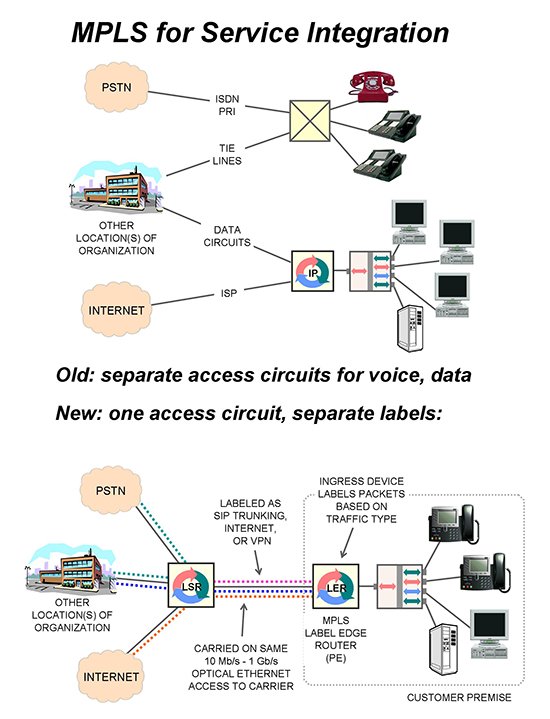
The solution to integrate all of this onto one access circuit and one network is twofold:
At the source,
• Format all types of traffic the same way, and
• Paste an identifier on the front of each piece of traffic, indicating what it is and where it goes.
Then all traffic can be carried interspersed on the same access circuit and in the same network, which results in a huge cost savings for both the customer and the carrier.
The identifier on the traffic is used to both route the traffic to the correct destination, and manage the traffic in the network, performing functions like load balancing, prioritization and restoration.
Starting in the 1980s, telephone companies and equipment manufacturers attempted to implement this with a technology called Asynchronous Transfer Mode (ATM). Literally billions of dollars were spent developing and deploying ATM from 1980 to 2000… but it failed and died, becoming too complex and too expensive, and not used for voice at the big telephone companies.
Multiprotocol Label Switching (MPLS) combined with IP has succeeded where ATM failed and is now universally implemented.
Of course, there is a lot of jargon to learn and many components to the “MPLS” story.
Here is a VERY brief explanation:
• All traffic is formatted into IP packets by the equipment that generates it, for example, a telephone or computer.
• Traffic is categorized into classes. A class of traffic goes from the same place to the same place and experiences the same transmission characteristics like delay and lost packets.
• A packet is identified as belonging to a particular class by pasting a number called a label on the front of the IP packet.
• The device that does the classification and labeling of packets is the ingress device, called a Label Edge Router in MPLS. It is normally Provider Equipment (PE), meaning owned and furnished by the service provider, located at the customer premise.
• Network equipment, called Label Switching Routers in MPLS, use the label number to route and in some cases prioritize the packet.
• Labels can be stacked, meaning one label pasted in front of another. This allows the network to manage similar kinds of traffic as a single entity in network control systems.
Returning to our example illustrated above, the four circuits illustrated at the top of the diagram can be replaced with one access circuit with three traffic classes (three labels). The physical access circuit could be 10 Mb/s to 10 Gb/s Optical Ethernet.
The three traffic classes / labels would be:
• A traffic class for telephone calls. This might be called a “SIP trunking service” by the marketing department. This class will carry VoIP phone calls to the carrier for communication to other locations of the organization, or for conversion to traditional telephony for phone calls to the public telephone network.
• A traffic class for data. This might be called a “VPN service” by the marketing department. This class carries file transfers, client-server database communications and the like securely to other locations of the organization.
• A traffic class for Internet traffic. This class carries anything in IP packets to the Internet.
All of this traffic is IP packets interspersed over the single access circuit.
At the other end of the access circuit, the carrier uses the label to route the traffic onward and possibly prioritize it to assure the appropriate service level.
The result is all of the organization’s traffic carried over a single access circuit, using a single technology.
This is one of the Holy Grails of the telecommunications business, called convergence or service integration, having significant advantages in cost and flexibility.
This is a concise description of a story that has many different facets.
In Teracom training, this discussion comes AFTER many other lessons explaining all of the underlying concepts, related technologies like PRI and SIP trunking and their jargon.
If you would like the whole story, it is currently included in the following training:
Course 101: Telecom, Datacom and Networking
for Non-Engineering Professionals
Certified Telecommunications Network Specialist (CTNS)
Online telecommunications certification courses
Telecom, Datacom and Networking for Non-Engineers textbook
and DVD-Video Courses V3 and V4.
Cheers!
Development #2: Optical Ethernet has replaced SONET
A closer look at the second item in our list of eight major recent developments and trends in telecom
Telecommunications technology is constantly changing and improving – seemingly faster and faster every year – and at Teracom, we keep our training courses up to date to reflect these changes. In a previous post, we identified eight major developments and trends in telecommunications incorporated in our training.
In this post, we take a closer look at the second one:
Optical Ethernet has replaced SONET for all new core fiber network projects, and is also routinely used for “last mile” connections, achieving a long-held goal in telecommunications: one technology for all parts of the network.
Ethernet was a brand name for the first LAN, developed at Xerox’s Palo Alto Research Center in Silicon Valley. The mouse and the graphical user interface used in Windows and Macs appear to have also been invented there. And people say Xerox never does anything original…
An almost-identical technology was subsequently codified in the 802 series of standards from the Institute of Electrical and Electronic Engineers (IEEE). Products conforming to the IEEE 802 standards ended up dominating the market, and Ethernet no longer exists. When people say “Ethernet” today, they are referring to IEEE 802 standards.
Ethernet moves frames of data between computers that are on the same physical circuit. A frame is a block of data, typically about 1500 bytes, prefaced by the address of the receiver, the address of the sender and control information, followed by an error check.
The addresses are Media Access Control (MAC) addresses, 48-bit numbers identifying the LAN chip in each computer. LAN frames are also called MAC frames.
In the beginning, many computers were connected together by tapping onto a coaxial copper-wire “bus” cable.

Today, one computer is connected with a LAN cable to one port on a LAN switch as illustrated in the diagram. The LAN switch moves frames internally from one port to another, and hence from one computer to another.
Ethernet was developed for communicating data packets between computers inside a building, in a bursty, as-needed manner.
Ethernet then escaped and took over the world of fiber connections between buildings, replacing the previous technology used for fiber backbones called SONET.
SONET carried 64 kb/s streams of bits called DS0 channels on fiber between buildings. It was designed to carry phone calls in these channels. It can also carry data packets on these channels. But using channels for communications is not efficient, since the bits in the channel are reserved whether there is anything to transmit or not, and the channels only go between fixed places.
The new-generation all-IP telecom network does not use channels. Everything is put in IP packets, which are created and transmitted only when there is information to be communicated, and routed one-by-one to different destinations. This is more efficient and much more flexible.
Packets are transmitted from the originating machine in a MAC frame on a physical circuit to a router, then to the next router in another city, to the next router, and finally delivered in a MAC frame on a physical circuit to the destination.
The connections between routers in different cities are LAN cables… but not the familiar blue copper-wire LAN patch cables used in-building. Inter-city LAN cables are made of glass fiber. A MAC frame is signaled from one end to the other by pointing a laser into the fiber and turning it on and off. Light on means “1” and light off means “0”. This is called Optical Ethernet, and allows much higher bit rates and much longer reach than copper wire LAN cables.

Today, Optical Ethernet is not used just for inter-city links, but also for the access circuit, the circuit from the customer to the network, sometimes called the “last mile”.
The use of Ethernet for in-building communications, access circuits and intercity backbones represents the achievement of a long-held goal in the telecommunications business: to save money by using the same technology in all parts of the network.
This is a concise description of a story that has many different facets. If you would like to learn more, for example, the relationship between Ethernet and IP, how packets and frames work together, the difference between a LAN switch and a router, why Ethernet is “Layer 2” and IP is “Layer 3”, about LAN cables and fiber optics, convergence and service integration, those topics and much more are covered in the following Teracom training:
Course 101: Telecom, Datacom and Networking
for Non-Engineering Professionals
Certified Telecommunications Network Specialist (CTNS)
Online telecommunications certification courses
Telecom, Datacom and Networking for Non-Engineers textbook
DVD-Video Courses V2, V3 and V4
and in free tutorials on teracomtraining.com.
Cheers!